Is Siri Always Listening?
There is something mildly unsettling about a device that can be sitting quietly on a table, hear you say “Siri”, and immediately come to life.
It raises an obvious question:
Was it listening to everything before that?
Well, yes.
But probably not in the way the word listening makes you imagine.
Your iPhone does need to continuously pay attention to incoming sound if you have the voice trigger enabled. Otherwise there would be no way for it to know that you just said “Siri” or “Hey Siri.”
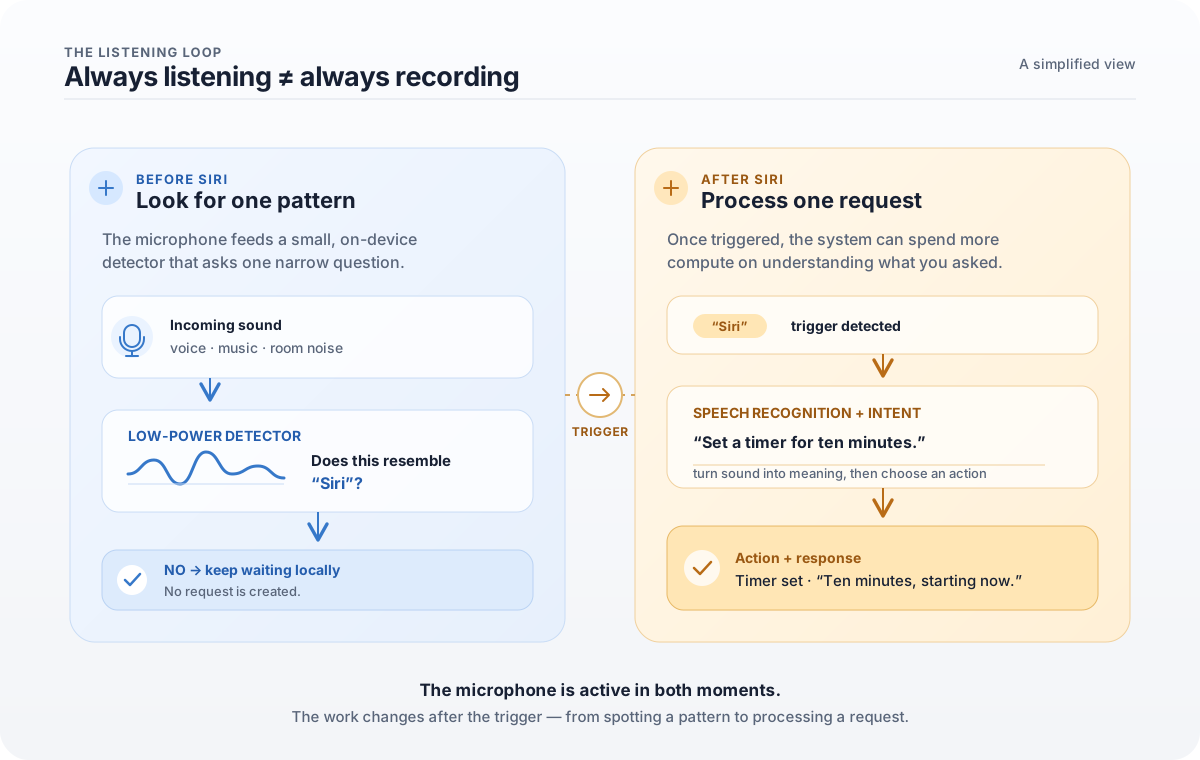
But continuously looking for a particular sound pattern is very different from continuously recording, understanding, and sending everything you say somewhere else.
That distinction is where things get interesting.
Start with the microphone
Sound is just moving air.
When you speak, your vocal cords create pressure waves that travel through the air until some of them reach the microphone in your phone.
The microphone turns those tiny physical vibrations into an electrical signal, which the device can then represent digitally.
Very roughly:
Your voice
    ↓
Vibrations in air
    ↓
Microphone
    ↓
Electrical signal
    ↓
Digital audio
None of this requires Siri to understand anything.
At this point your phone does not need to know whether you said “Siri”, discussed dinner plans, or dropped a spoon on the floor.
It just has sound.
The interesting part is figuring out whether a tiny piece of that sound resembles the phrase the device is waiting for.
A neural network with one very small job
Apple has published quite a bit about how its voice-trigger system works.
In its original technical explanation of Hey Siri, Apple described a small speech recognizer running on the device whose job was essentially to continuously look for the trigger phrase.
Not to transcribe the room.
Not to understand the conversation.
Not to answer questions.
Just:
Does this sound like the Siri trigger?

Yes / No
That simplicity is important.
We often hear the words neural network and imagine some enormous artificial intelligence trying to understand the world.
But neural networks can also be trained for remarkably narrow tasks.
This one can spend its time looking at tiny pieces of incoming audio and estimating how likely they are to correspond to the speech sounds it expects.
Apple’s engineers described the original system as converting acoustic patterns into probabilities for different speech sounds and then looking for the sequence corresponding to “Hey Siri.”
You don’t need to understand the mathematics to understand the idea.
Imagine someone standing at a door who has been given exactly one instruction:
Only get my attention if you hear someone say my name.
They don’t need to write down every conversation happening outside.
They only need to notice the pattern they have been told to look for.
Your phone is doing something conceptually similar — except the guard is a tiny machine-learning model running on silicon.
Apple’s original technical explanation of the Hey Siri detector
The device does not wake everything up for every sound
There is another problem.
Running the most powerful parts of an iPhone continuously would be a spectacular way to destroy its battery life.
So Apple designed the trigger system to do as little work as possible while it waits.
In Apple’s published description of the original architecture, a small detector could operate using low-power hardware. When it became sufficiently confident that it had heard “Hey Siri,” the system could wake more capable parts of the device and perform additional checking.
Think of it as two doors:
Incoming sound
      ↓
Small, low-power detector
      ↓
Does this resemble "Siri"?
      ↓
     No ───────────→ Keep waiting
      ↓
    Maybe
      ↓
Wake more capable hardware
      ↓
Check more carefully
      ↓
     Yes
      ↓
Activate Siri
The exact implementation has evolved over the years — Apple now supports both “Siri” and “Hey Siri” on many of its devices — but the fundamental engineering problem remains the same:
How do you reliably detect a tiny phrase in an unpredictable world without keeping the entire computer fully awake?
Cars drive past.
Music is playing.
Someone is cooking.
The television says something vaguely similar to Siri.
You might be speaking from across the room.
The phone has to distinguish the signal it cares about from a ridiculous amount of noise.
In 2023, Apple published another look at its voice-trigger system while explaining how it added support for simply saying “Siri.” A shorter trigger phrase is actually harder in some ways: there is less acoustic information available, which can make accidental triggers more likely.
Apple on the modern Siri voice-trigger system
What about recognizing your voice?
There is another layer.
On personal devices, Siri can also use information about the way you say the trigger phrase.
Apple has described a speaker-recognition system that compares characteristics of the incoming voice with a representation created during Siri setup.
Again, the goal is narrower than it sounds.
The phone is not asking:
Who is this human being in the philosophical sense?
It is trying to answer something much more practical:
Does this voice resemble the person who trained Siri on this device?
That helps reduce unwanted activations and enables personalized behavior.
Apple’s explanation of personalized Hey Siri
Then Siri actually wakes up
Everything so far has mostly been about getting to this moment.
You say:
“Siri, set a timer for ten minutes.”
The trigger system detects Siri.
Now the problem changes completely.
The phone no longer needs to answer:
Did someone say the wake phrase?
It needs to figure out:
What did Jainam actually ask me to do?
That requires speech recognition: turning the sound of your voice into a representation the system can work with.
Then Siri has to understand the request, decide what capability is needed, perform the action, and possibly generate a response.
Conceptually:
"Siri"
   ↓
Voice trigger detected
   ↓
Siri activates
   ↓
"Set a timer for ten minutes"
   ↓
Speech recognition
   ↓
Understand the request
   ↓
Perform the action
   ↓
"Ten minutes, starting now."
What looked like one effortless interaction is actually a chain of very different computing problems.
And all of it happens quickly enough that we barely notice.
So is my conversation being sent to Apple all day?
This is the part people usually care about most.
According to Apple’s current privacy documentation, the audio of Siri requests can be processed on-device on supported devices rather than being sent to Apple simply for speech recognition.
Apple also says that it does not retain audio recordings of Siri interactions unless a user explicitly opts in to its Improve Siri & Dictation program.
If you do opt in, Apple says samples of Siri and Dictation interactions — including audio, transcripts, and related request data — may be stored and reviewed to improve those systems.
That setting can be turned off.
So there are two very different moments worth separating:
Before Siri is triggered

Your device is locally looking
for a specific wake phrase.

            ↓

After Siri is triggered

Your actual request is processed,
which may involve additional systems
depending on what you asked.
Those two things are easy to collapse into “my phone is always listening to me.”
Technically, it is listening for something.
That does not mean it is continuously sending a transcript of your life to Apple.
Apple’s overview of its privacy protections
Apple’s Siri, Dictation & Privacy documentation
Apple’s Improve Siri & Dictation privacy documentation
The part I find fascinating
What fascinates me about this isn’t really Siri.
It’s how much engineering disappears behind an interaction that eventually becomes completely ordinary.
You say two syllables.
The phone wakes up.
That’s it.
But underneath those two syllables are acoustics, microphones, digital signal processing, neural networks, probability, power management, specialized silicon, speech recognition, privacy architecture, and years of engineering devoted to making all of that complexity disappear.
The best technology often ends up feeling almost boring.
You stop thinking about the thousands of decisions underneath it and simply expect it to work.
And sometimes all it takes is one small question —
Wait, how did my phone know I said Siri?
— to fall through the abstraction and discover everything happening underneath.
I like questions like that.
Sources and further reading
I wanted this explanation to stay grounded in information Apple has made publicly available rather than guessing about what happens inside the device.
- Hey Siri: An On-device DNN-powered Voice Trigger for Apple’s Personal Assistant — Apple Machine Learning Research
- Voice Trigger System for Siri — Apple Machine Learning Research
- Personalized Hey Siri — Apple Machine Learning Research
- Privacy Features — Apple
- Siri, Dictation & Privacy — Apple
- Improve Siri & Dictation & Privacy — Apple
- Our longstanding privacy commitment with Siri — Apple